


Planen von SFTP-Uploads mit cron
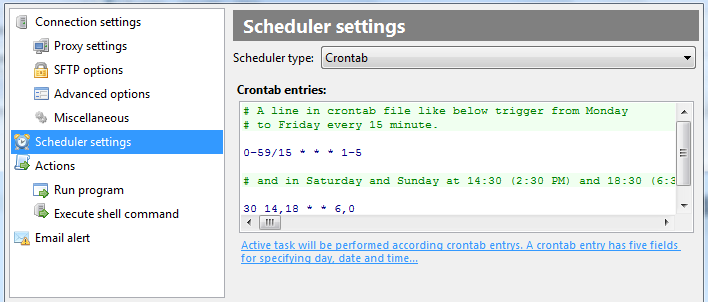
Während FTPGetter mit einem benutzerfreundlichen integrierten Taskplaner ausgestattet ist, sind seine Konfigurationsmöglichkeiten natürlich auf das beschränkt, was die grafische Benutzeroberfläche bieten kann. Wenn Sie bereit sind, ein paar Befehlszeilenoptionen zu lernen, erhalten Sie die gesamte Leistung des branchenüblichen Cron-Schedulers.
Crontab syntax
Das Cron-Format ist eine einfache, aber äußerst leistungsfähige und vollständig konfigurierbare Möglichkeit, Aufgaben anzugeben, die einmalig oder regelmäßig zu bestimmten Zeiten ausgeführt werden sollen.
Es gibt fünf Felder im Cron-Format.
* * * * *- - - - -| | | | || | | | ----- Day of week (0 - 7) (Sunday =0 or =7)| | | ------- Month (1 - 12)| | --------- Day (1 - 31)| ----------- Hour (0 - 23)------------- Minute (0 - 59)
Jedes Feld kann mit einem Stern "*" gefüllt werden, was den gesamten Wertebereich bedeutet, oder "alle". Der Stern gibt "jede Minute", "jede Stunde", "jeden Tag" an " und so weiter.
Felder können auch Listen mit durch Kommas getrennten Werten wie "1,3,7" sowie Intervalle wie "1 enthalten -5".
Wenn Sie möchten, dass eine Aktion jeden zweiten Tag ausgeführt wird, geben Sie den Schritt nach dem "*" oder ein Intervall an. Wenn Sie beispielsweise möchten, dass die Aufgabe jeden zweiten Tag ausgeführt wird, würden Sie "*/2" angeben, was genau das bedeutet - "einmal alle zwei Tage Tage". Natürlich würde ein Wert von "0-23/2" im Feld "Stunde" bedeuten "alle zwei Stunden den ganzen Tag". Alternativ könnten Sie denselben Wert auch als Liste "0,2,4,6,8,10,12,14,16,18,20,22" angeben . Ebenso wird der Task alle vier Minuten ausgeführt, wenn Sie den Wert "*/4" in das Feld "Minute" eingeben; der Wert von "1-30/3" hat dieselbe Bedeutung wie "1,4,7,10,13,16,19, 22,25,28".
Beispiele:
* * * * * * Every minute59 23 31 12 5 * One minute before the end of the year, if the year end falls to Friday45 17 7 6 * * Every year on 7th of June at 17:4545 17 7 6 * 2001,2002 Once a year on 7th of June at 17:45, if the year is 2001 or 2002 0,15,30,45 0,6,12,18 1,15,31 * 1-5 * At 00:00, 00:15, 00:30, 00:45, 06:00, 06:15, 06:30, 06:45, 12:00, 12:15, 12:30, 12:45, 18:00, 18:15, 18:30, 18:45, on the 1st, 15th and 31st of every month from Monday to Friday only*/15 */6 1,15,31 * 1-5 * At 00:00, 00:15, 00:30, 00:45, 06:00, 06:15, 06:30, 06:45, 12:00, 12:15, 12:30, 12:45, 18:00, 18:15, 18:30, 18:45, on the 1st, 15th and 31st of every month from Monday (yet another notation)* * * 1,3,5,7,9,11 * * Every minute in January, March, May, July, September, and November0 9 1-7 * 1 * First Monday of every month at 9 am0 0 1 * * * Midnight on the first day of every month* 0-11 * * * Every minute before noon* * * 1,2,3 * * Every minute in January, February, and March0 0 * * * * Every midnight0 0 * * 3 * Every midnight on Wednesdays
Komplexe, mehrzeilige Datensätze können einfach angegeben werden, z.
0 9 1-7 * 1 * 0 0 1 * * *Die obigen Aufzeichnungen geben an, dass die Aufgaben am ersten Montag jedes Monats um 9 Uhr morgens und um Mitternacht sowie am ersten Tag jedes Monats ausgeführt werden.