
 Español ⯆
¿Cómo renombrar un archivo en un ordenador local que acaba de ser cargado o descargado?
Si necesita renombrar un archivo después de una operación de carga o descarga exitosa, debe utilizar un trigger post-transfer.
Un trigger post-transfer se ejecuta después de una transferencia de archivos exitosa entre el servidor remoto y el ordenador local y le permite ejecutar cualquier programa, script de PowerShell o archivo bat. Como parámetros, puede utilizar variables integradas de FTPGetter como la variable %local_file%, que representa la ruta completa del archivo transferido en el ordenador local, variables relacionadas con fechas y otras.
Ejemplo #1: Renombrar el archivo transferido en el ordenador local.
Para realizar esta operación, cree un archivo bat con el siguiente contenido en cualquier editor de texto.
SET "fullpath=%~dp2"
if not exist "%fullpath%" mkdir "%fullpath%"
rename /Y %1 %2
Guarde este archivo como my-copy.bat en cualquier carpeta de su elección.
¡Nota importante! Si está utilizando FTPGetter en modo de servicio de Windows, asegúrese de que la cuenta bajo la cual se ejecuta el servicio tenga acceso completo a esta carpeta.
En FTPGetter, este archivo bat debe llamarse de la siguiente manera:
D:\my-bats\my-rename.bat

"%local_file%" "new_%local_file_name_only%.%local_file_name_ext%"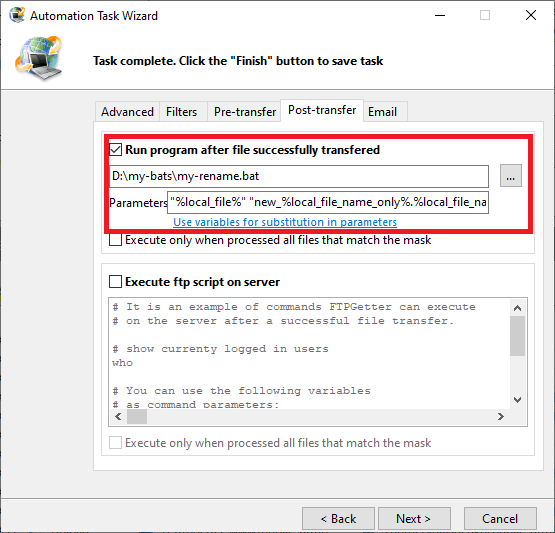
Cómo funciona. Después de una transferencia de archivos exitosa, FTPGetter ejecuta el archivo bat my-copy.bat con dos parámetros. El primer parámetro es la variable %local_file%, que contiene la ruta completa del archivo transferido recientemente (en el ordenador local). El segundo parámetro es una combinación de variables que representan la ruta a la carpeta donde ya se encuentra el archivo transferido, el prefijo que se añadirá al nombre del archivo y la extensión actual del archivo.
A continuación se muestran ejemplos de diferentes archivos bat para renombrar archivos:
Ejemplo #2: Renombrar un archivo agregando la fecha actual al nombre del archivo.
D:\my-bats\my-rename.bat

"%local_file%" "%local_file_name_only%-%c_yyyy%-%c_mm%-%c_dd%.%local_file_name_ext%"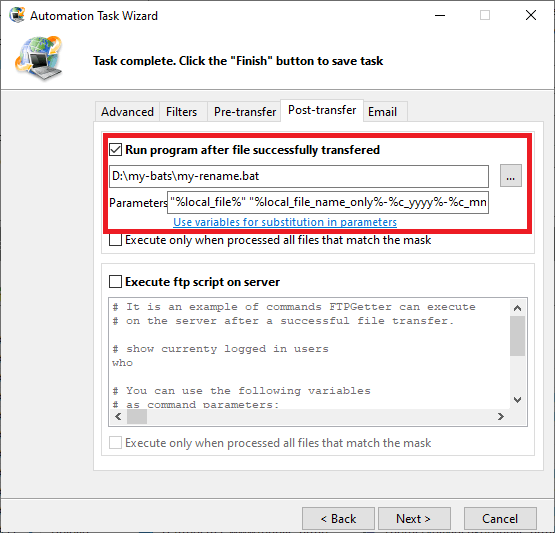
Ejemplo #3: Renombrar un archivo con una nueva extensión .done
D:\my-bats\my-rename.bat

"%local_file%" "%local_file_name_only%.%local_file_name_ext%.done"
Tenga en cuenta que no puede especificar una nueva unidad o ruta para el archivo de destino.
A continuación veremos cómo copiar, mover o descomprimir un archivo descargado recientemente.
¿Necesita renombrar un archivo en el servidor SFTP después de la transferencia?